
- Staydesk
- Hospitality
- WhatsApp for Hotels
- Guest Requests
- QR Ordering
- F&B
WhatsApp Guest Requests and QR Ordering for Hotels: How Staydesk Helps Hospitality and F&B
Guests chat on WhatsApp instead of calling reception: food orders, water, WiFi, housekeeping. Staff log in to their own dashboard and close every request as a work order. How Staydesk helps hotels, resorts and restaurants.
Muthu Kumar · · 12 min read
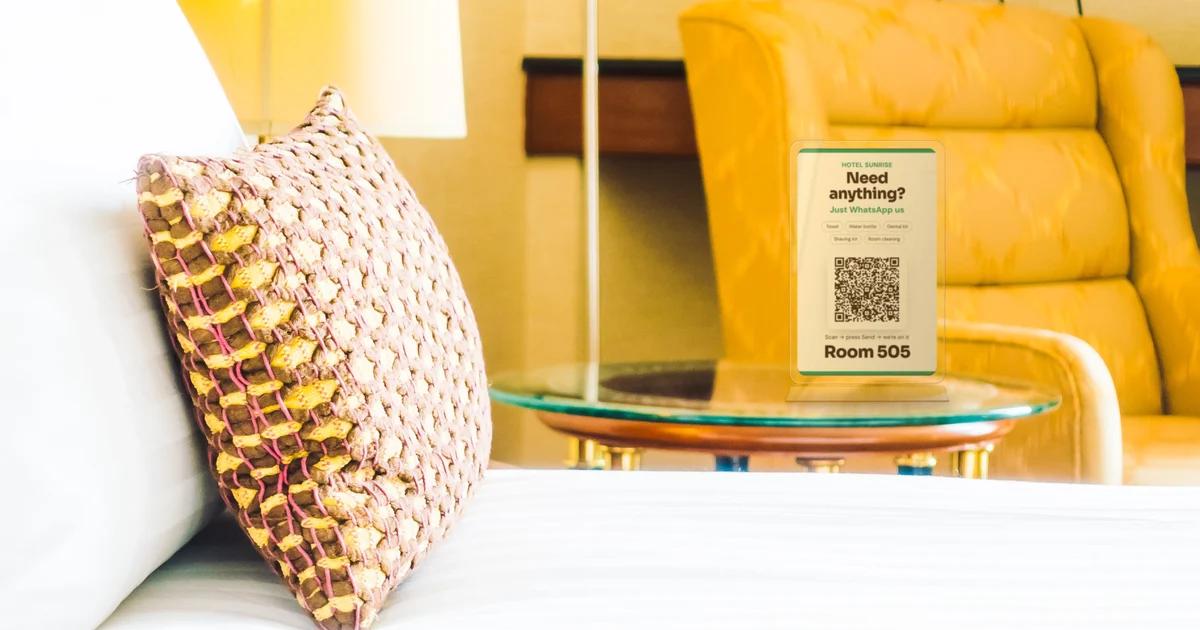
A guest in Room 204 wants two bottles of water, the WiFi password and a plate of dosa. They call reception. The line is busy. They try again, give up on the food and order from a delivery app instead.
Every hotel knows this. Reception phones ring all day with small requests, staff write them on paper, some get forgotten at shift change, and guests feel ignored. Meanwhile room service orders, and F&B (food and beverage) revenue, quietly go to someone else.
Staydesk fixes this with something every guest already uses: WhatsApp. Instead of calling, guests simply chat. Instead of paper notes, your staff get every request on their own dashboard and close it as a work order.
In this article I explain how Staydesk works, how guest chat and work orders help the hospitality industry, why staff login matters, and how it compares with the usual ways of handling guest requests.
What is Staydesk?
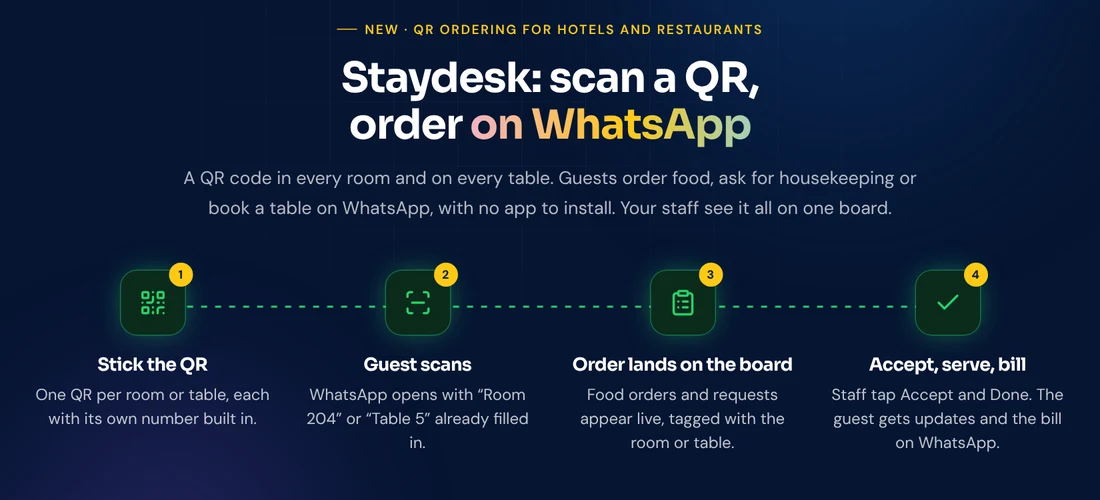
Staydesk puts a QR code in every hotel room and on every restaurant table. A guest scans it with their phone camera, WhatsApp opens with the room or table number already typed, and they can:
- order food from your menu,
- ask for housekeeping, towels, water or an extra bed,
- book a table, or
- ask for the WiFi password and hotel information.
Guests need no app and no login. They chat on WhatsApp like they would with a friend.
Staff must log in. Every staff member signs in to the Staydesk dashboard with their own username and password, and every order and request lands there, tagged with the right room or table number. Without a login, nobody can see or handle guest requests.
Guests chat on WhatsApp instead of calling reception
A QR code is only the start. Once WhatsApp opens, the guest can ask for anything, in their own words:
- "Please send 2 water bottles to my room."
- "What is the WiFi password?"
- "Can I get an extra pillow and a dental kit?"
- "Room cleaning at 11, please."
- "Can I check out at 1 pm?"
- "One masala dosa and a filter coffee."
Simple questions like the WiFi password, check-out time or breakfast hours are answered instantly by replies you set up once. Everything else becomes a request for your team.
For the guest, chatting is easier than calling: no waiting on hold, no repeating the room number, and a written record of what they asked. For your front desk, it means far fewer phone calls and no requests scribbled on paper.
Every request becomes a work order
Each chat request lands on the dashboard as a work order with the room or table number, the time and what the guest asked for. It then moves through three simple steps:
- New: the guest asked, and it appears on the board straight away.
- Accepted: a staff member taps Accept. The guest gets a WhatsApp message that someone is on it.
- Done: the job is finished, the staff member taps Done, and the guest is told. For food, the bill can go on WhatsApp too.
Nothing is forgotten at shift change, because open work orders stay on the board until someone closes them. And you can see at a glance what is pending, what is in progress and what is done.
Staff login is compulsory, and every staff member gets a dashboard
Guest requests, room numbers and orders are private information. That is why Staydesk does not work without a staff login:
- Every staff member gets their own login (username and password) and their own view of the dashboard.
- No login, no access. Nobody can see guest chats, orders or bookings without signing in.
- Front desk, housekeeping, kitchen and restaurant staff all work from the same board, so the right person picks up the right job.
- When someone leaves, you remove their login and their access ends.
Guests never need a login. Staff always do. That keeps things effortless for guests and safe for your property.
How Staydesk helps the hospitality industry
- Fewer phone calls at reception. Small requests move to WhatsApp chat, so your front desk can focus on check-ins and guests in front of them.
- Faster response, happier guests. Requests go straight to the board, and guests see "Accepted" and "Done" updates instead of wondering.
- Nothing missed. Every request is written down, with the room number and time, until someone closes it.
- Works at night. Guests can ask at 2 am; instant answers cover the common questions and the night staff see the rest.
- Better reviews. Quick service is what guests remember, and after checkout a friendly message can ask happy guests for a Google review.
- More F&B revenue. The menu is one scan away, so guests order from your kitchen instead of a delivery app.
How the QR code helps your F&B business
1. More room service orders
Most guests do not call reception to order food. Calling feels like effort, and they are never sure what is available. When the menu is one scan away, with prices and an order button, ordering becomes as easy as using a food delivery app, except the food comes from your kitchen.
2. The right order reaches the right place
Every room and every table has its own QR. When a guest orders, your staff see "Room 204: 2 × Masala Dosa, 1 × Filter Coffee" or "Table 5: 1 × Veg Biryani". No wrong room, no misheard order, no "which table was that?".
3. Faster service in the restaurant
Guests do not wait for a waiter to bring the menu or take the order. They scan, order and the kitchen starts. Faster orders mean faster table turns at lunch and dinner, and waiters spend their time serving instead of running back and forth.
4. Menu and prices change in seconds
Price of paneer went up? A dish is sold out tonight? Change it once in the dashboard and every QR in every room and on every table shows the new menu at once. No reprinting menu cards.
5. Guests always know what is happening
Each order moves through three steps on your board: New, Accepted and Done. When your staff tap Accept or Done, the guest gets an update on WhatsApp. Fewer "where is my food?" calls to reception.
6. Bills on WhatsApp, and guests you can reach again
The food bill and receipt go to the guest on WhatsApp. No paper slips and no disputes at checkout. Every guest who ordered is saved, so with their consent you can share offers later, and after checkout a friendly message can ask happy guests for a Google review.
This is how it looks in a guest room
The QR poster stands on the bedside table or side table in a slim, clear acrylic stand. Guests see it the moment they sit down.
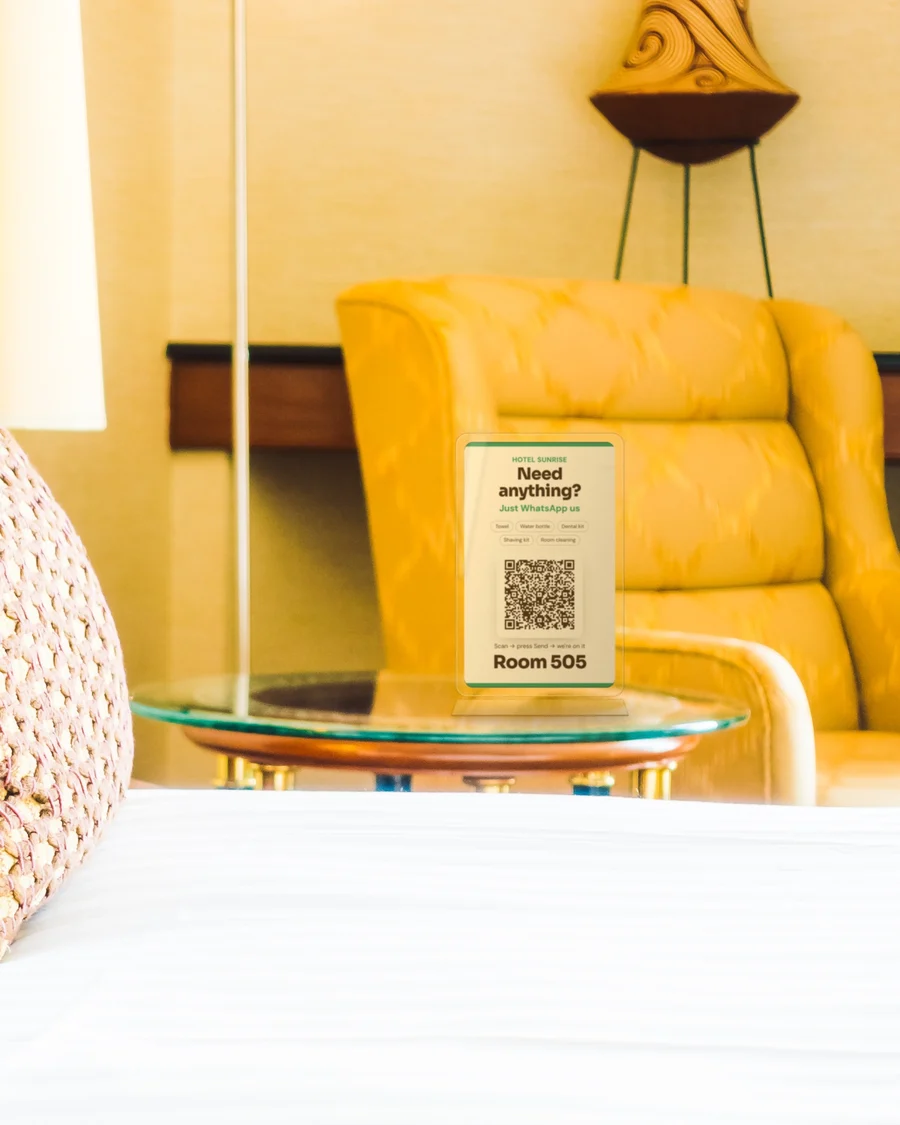
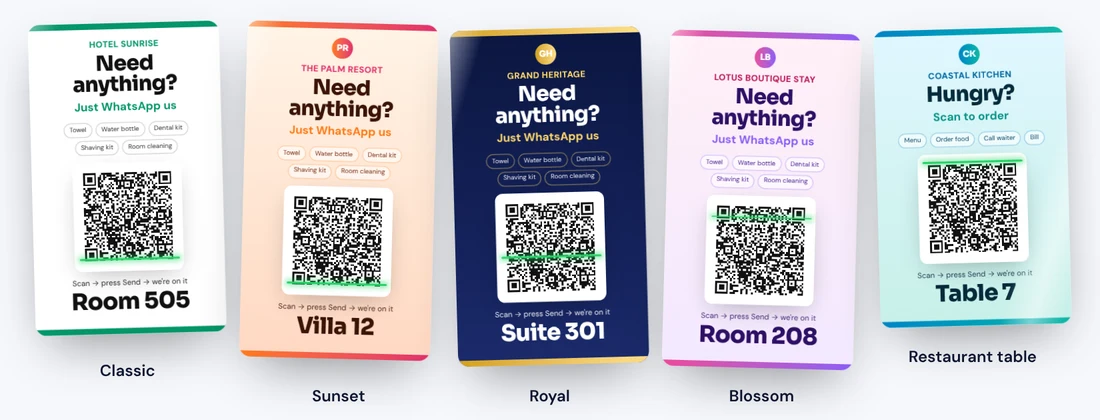
Every poster carries your hotel or restaurant name, your logo and its own room or table number. There are five designs to match your property, from a clean classic look to colourful styles for resorts, heritage hotels and cafés.
What your staff see
Every staff member signs in with their own username and password and sees every order, request and table booking on one screen.
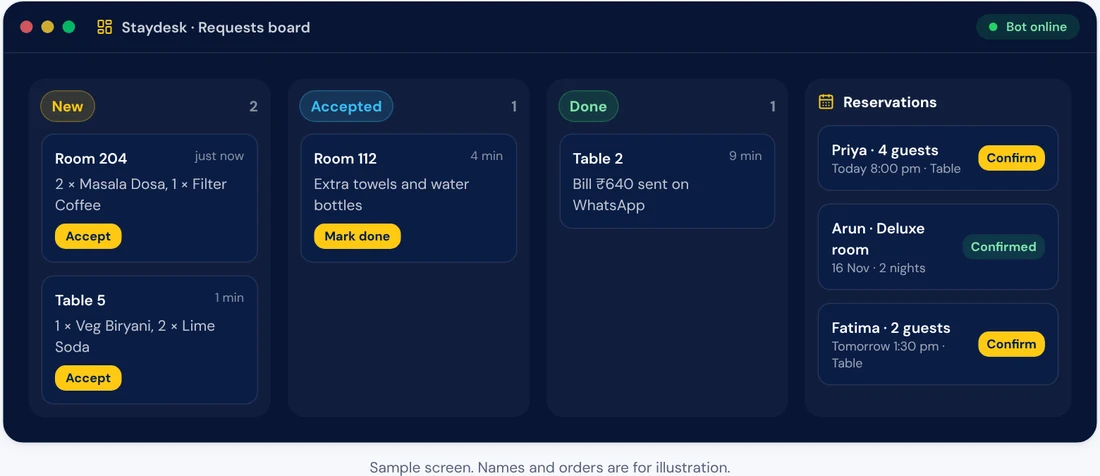
From the same dashboard you can:
- Accept and complete orders and requests, with WhatsApp updates to the guest at each step.
- Confirm or decline room and table reservations.
- Edit the menu: dishes, prices, categories and photos, and switch items off when they are sold out.
- Download the QR for each room or table in your chosen design.
- Edit the replies: welcome message, WiFi details and hotel information.
- See reports: bills sent, orders per day and your most ordered dishes.
What your guests see
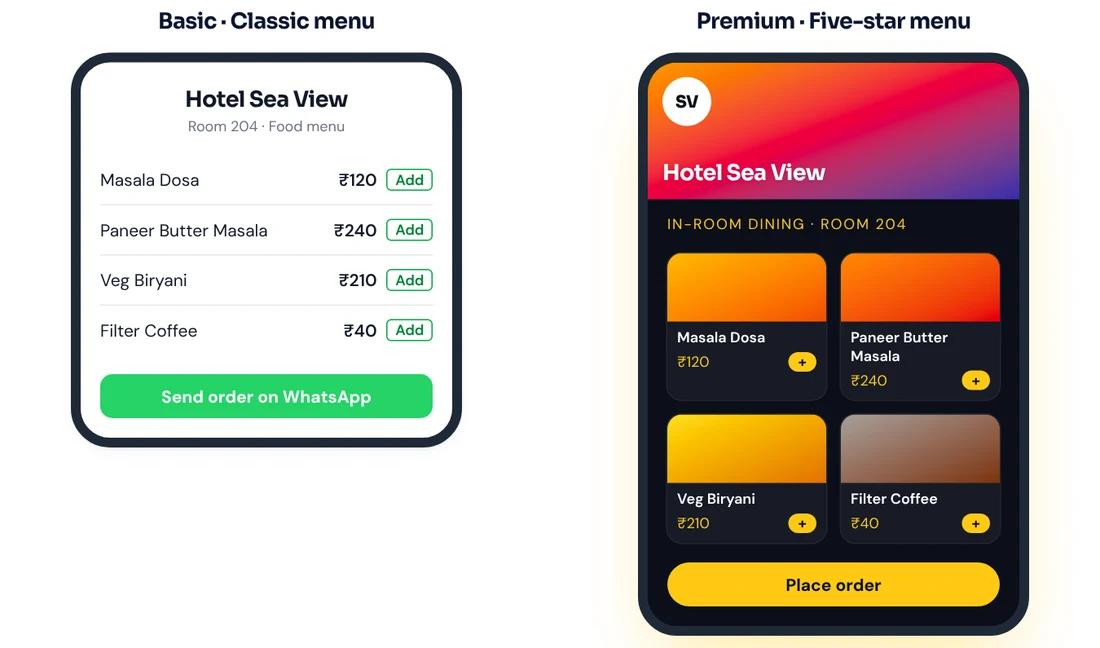
Guests get a clean menu with prices and an order button. On Premium, the menu becomes a five-star order page with your cover photo and dish photos, which helps guests order more.
Staydesk compared with the usual ways
| Paper menu + phone call | PDF menu on a QR | Separate ordering app | Staydesk | |
|---|---|---|---|---|
| Guest needs to install something | No | No | Yes | No, works on WhatsApp |
| Guest can order from the QR | No | No, view only | Yes | Yes |
| Order arrives with room or table number | Depends on staff | No | Sometimes | Always, automatically |
| Change prices without reprinting | No | Re-upload the PDF | Yes | Yes, instantly |
| Guest gets order updates | No | No | In the app | On WhatsApp |
| Housekeeping and service requests | Phone call | No | Rarely | Yes, by WhatsApp chat |
| Requests tracked as work orders | Paper notes | No | Sometimes | Yes, New, Accepted, Done |
| Staff login and dashboard | No | No | Varies | Yes, compulsory for every staff member |
| Bill and receipt sent to the guest | Paper | No | In the app | On WhatsApp |
| Works for rooms and tables together | Yes | Yes | Usually one or the other | Yes |
What makes Staydesk different
- WhatsApp, not another app. Your guests already use WhatsApp every day. Nothing to download, nothing to sign up for.
- Chat instead of calls. Guests ask for anything on WhatsApp: water, towels, WiFi, room cleaning, food. No hold music, no busy line.
- One QR does everything. Food orders, housekeeping, table bookings, WiFi and hotel information all start from the same scan.
- Work orders, not paper notes. Every request is tracked from New to Accepted to Done, with the guest updated at each step.
- Secure staff login. Every staff member has their own login and dashboard. No login, no access to guest data.
- Built from real hotel operations. MK Solutions was started by a hospitality professional with more than 15 years in tourism and hotels. The board, the statuses and the guest messages follow how a real front desk and kitchen work.
- Your brand on every poster. Your name, your logo and the room or table number on a poster that fits your décor.
- Simple per room, per table pricing. You pay only for the rooms and tables you have.
- No setup fee and no maintenance charges. Our team sets up your rooms or tables, QR codes, menu and staff board completely, once. There are no maintenance charges during the year: everything is included in your plan.
Pricing in short
Basic: ₹29 per room or table per month. A clean, classic QR and menu.
Premium: ₹49 per room or table per month. Your logo, colourful poster designs and a five-star menu with dish photos.
Custom: talk to us. For chains and bigger properties.
Prices exclude 18% GST.
Minimum billing is 10 rooms or tables.
Pay for 12 months in one payment and your printed QR stickers for every room or table are free. On monthly payment, stickers are quoted separately.
QR stands are quoted separately, as per discussion.
For a 20-room hotel on Basic, that is ₹580 a month plus GST. One extra room service order a day usually covers it.
See the full plans, price calculator and terms.
Who is Staydesk for?
- Hotels and resorts that want more room service orders and fewer calls to reception.
- Homestays and boutique stays that do not have staff at the desk all night.
- Restaurants and cafés that want faster table ordering at peak hours.
- Hotels with a restaurant, using one system for rooms and tables.
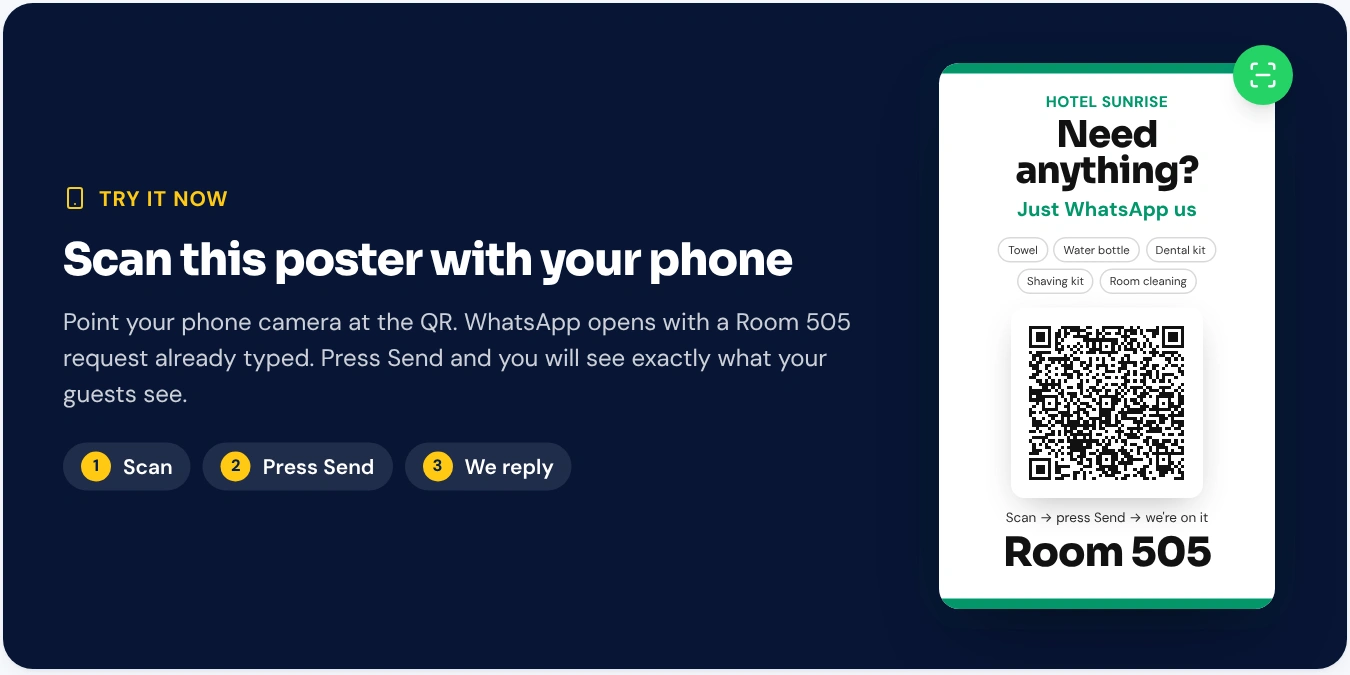
Try it yourself
Point your phone camera at the QR below. WhatsApp opens with a Room 505 request already typed. Press Send and you will see exactly what your guests see.
Common questions
Do guests need to install an app or log in? No. They scan the QR with their phone camera and WhatsApp opens with the room or table number filled in. They just chat.
Do staff need to log in? Yes, always. Every staff member has their own username and password. Without logging in, nobody can see or handle guest requests.
Can guests ask for things that are not on the menu? Yes. They can type anything: water, towels, an iron box, late checkout, a taxi. It comes to the dashboard as a work order for your team.
How does the restaurant know which table ordered? Every table has its own QR. The order arrives on your board tagged with that table number.
Can I change my menu and prices myself? Yes. Edit dishes, prices and photos in the dashboard any time, and every QR shows the new menu at once.
What if we have fewer than 10 rooms or tables? Minimum billing is 10 rooms or tables, so a smaller property pays for 10.
Get Staydesk for your property
See how Staydesk works, check the plans and pricing, or book a free demo and we will set up a sample QR with your own hotel or restaurant name.
If you have a question, call or WhatsApp us on +91 89034 13988. A real person will pick up.