
New · QR ordering for hotels and restaurants
StaydeskScan your orderA QR in every room and on every table
Guests scan, WhatsApp opens with their room or table number, and they order food, ask for housekeeping or book a table. No app to install. Your staff accept and complete every request from one board.
- No app for guests
- Hotels and resorts
- Restaurants and cafés
- Official WhatsApp
Hotel Sunrise
Need anything?
Just WhatsApp us
- Towel
- Water bottle
- Dental kit
- Shaving kit
- Room cleaning
Scan → press Send → we're on it
Room 505
Scanning QR…
Open WhatsApp
Room 505: I need a towel, please 🙏
On the way! Housekeeping will reach Room 505 in 5 minutes. 😊
New request · Room 505
Accepted by housekeeping
Animation: a guest in a hotel room scans the Staydesk QR poster on the bedside table, WhatsApp opens with "Room 505: I need a towel", and the hotel replies that housekeeping is on the way.
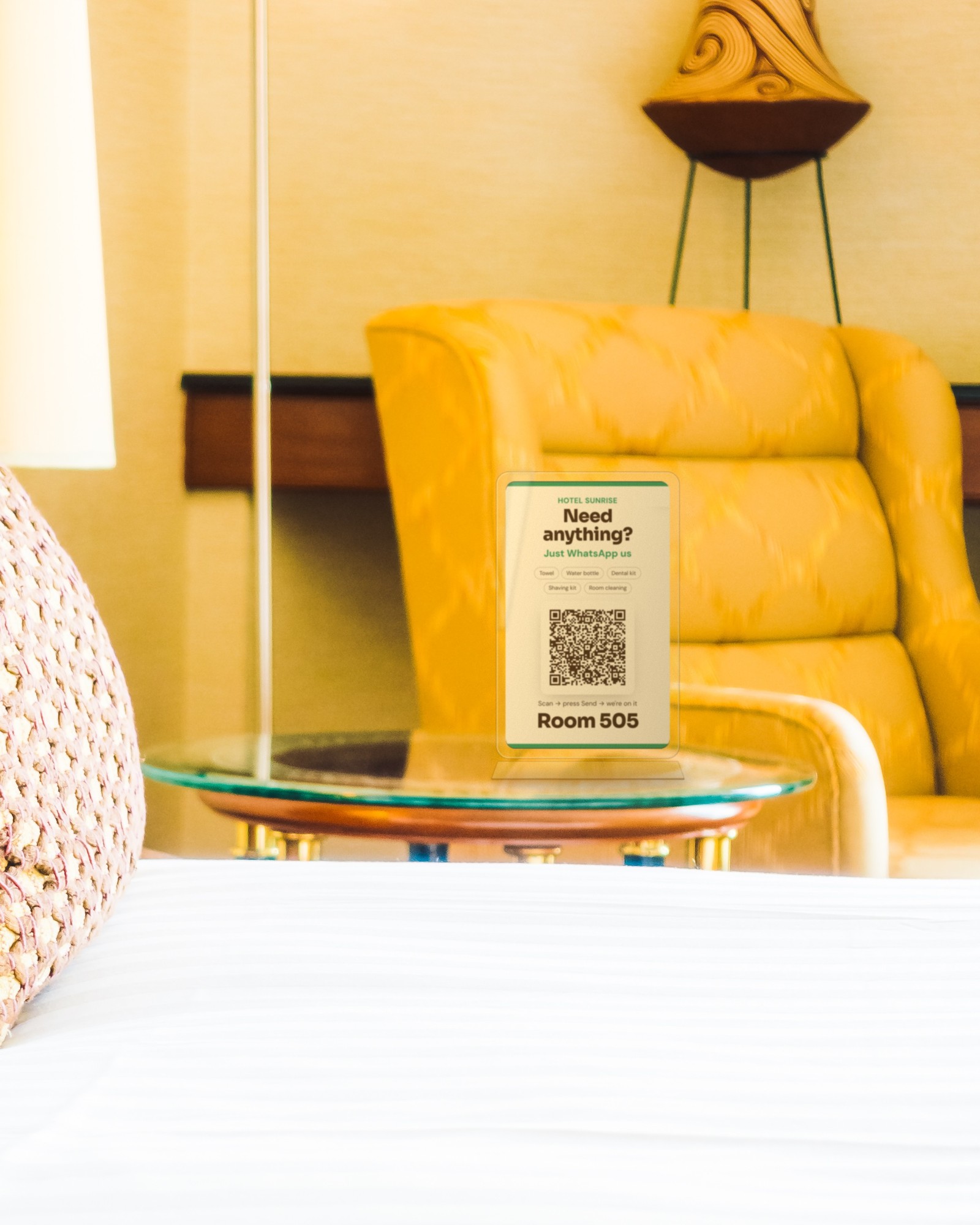 In the room
This is how Staydesk looks in a guest room
Every room gets its own poster with its own QR and room number, standing on the table next to the bed.
- Right where guests lookThe poster stands on the bedside table or the side table, so guests see it the moment they sit down.
- A clear acrylic standA slim see-through stand keeps the poster upright and clean, and fits any room décor. Stands are quoted separately.
- One scan from the bedGuests point their phone, WhatsApp opens with the room number already typed, and they press Send.
QR posters
A poster in every room, on every table
Pick a design that matches your hotel or restaurant. Every poster carries your name, your logo and its own room or table number.
Try it now
Scan this poster with your phone
Point your phone camera at the QR. WhatsApp opens with a Room 505 request already typed. Press Send and you will see exactly what your guests see.
- 1 Scan
- 2 Press Send
- 3 We reply
Hotel Sunrise
Need anything?
Just WhatsApp us
- Towel
- Water bottle
- Dental kit
- Shaving kit
- Room cleaning
Scan → press Send → we're on it
Room 505
New · QR ordering for hotels and restaurants
Staydesk: scan a QR, order on WhatsApp
A QR code in every room and on every table. Guests order food, ask for housekeeping or book a table on WhatsApp, with no app to install. Your staff see it all on one board.
- 1
Stick the QR
One QR per room or table, each with its own number built in.
- 2
Guest scans
WhatsApp opens with “Room 204” or “Table 5” already filled in.
- 3
Order lands on the board
Food orders and requests appear live, tagged with the room or table.
- 4
Accept, serve, bill
Staff tap Accept and Done. The guest gets updates and the bill on WhatsApp.
How it works for you
Made for hotels and restaurants
Each QR knows which room or table it belongs to, so every order and request reaches you with the right number.
 Scan · order · done
Hotels and resorts
- A QR in every roomGuests scan and WhatsApp opens with the room number already filled in. No app, no login.
- Room service ordersGuests pick dishes from your menu; the order lands on your board tagged with the room number.
- Requests in one tapTowels, housekeeping, extra bed, late checkout. Staff accept and mark it done; the guest gets an update.
- WiFi and hotel infoWiFi password, check-out time, breakfast hours and nearby places, answered instantly.
- Bill on WhatsAppThe food bill and receipt are sent to the guest on WhatsApp. No paper, no disputes.
- Reviews after checkoutA friendly message asks happy guests for a Google review.
 Scan · order · done
Restaurants and cafés
- A QR on every tableEach table has its own QR. Scan, order, done: the table number is attached automatically.
- Digital menu cardYour full menu with prices (and dish photos on Premium). Change a price once, every table sees it.
- Orders straight to the counterNew orders show on the board; staff accept, prepare and mark them served.
- Table reservationsGuests request a table on WhatsApp; the booking appears in your dashboard to confirm.
- Bill and receipt on WhatsAppSend the bill to the table's WhatsApp and share a receipt after payment.
- Repeat customersEvery guest who ordered is saved, so you can share offers later with their consent.
Your dashboard
Every order, request and booking on one screen
Sign in with your username and password. Staff accept a job, mark it done, and the guest is updated on WhatsApp at each step.
Sample screen. Names and orders are for illustration.
Order and request status
- 1NewGuest scanned and ordered
- 2AcceptedStaff took the job; guest is told
- 3DoneServed or completed; bill sent
Requests board
Every order and request, live, with the room or table number.
Reservations
Room and table booking requests to confirm or decline.
Menu editor
Add dishes, prices, categories and photos; switch items off when sold out.
QR codes
Download the QR for each room or table, in your chosen design.
Replies
Edit the welcome message, WiFi details and hotel information.
Bills and reports
Bills sent, orders per day and the most ordered dishes.
Menu card
How your menu looks to guests
Basic gives a clean, classic menu. Premium turns it into a five-star order page with your cover photo and dish photos.
Basic shows a plain list of dishes and prices with an order button. Premium shows your cover photo and logo, dish photos in a grid and a luxury order page.
| What guests see | Basic | Premium |
|---|---|---|
| QR design | Plain, clean sticker | 4 colourful creative styles |
| Your logo on the QR poster | ||
| Food menu page | Classic menu and order page | Luxury order page with cover photo |
| Dish photos | ||
| WhatsApp menu card | Text menu | Menu card with your cover photo |
| Order link address | Staydesk address | Your own address |
Staydesk plans
Simple per room, per table pricing
Pick a plan, enter your rooms or tables and pay online. Same price monthly or yearly; pay 12 months and your QR stickers are free.
Per room per month · + 18% GST · minimum 10 rooms · no discounts
Basic
Everything a room or table needs to order on WhatsApp.
₹29/room/month
+ 18% GST · min 10 rooms
- Room or table QR on WhatsApp
- Plain, clean QR sticker design
- Requests board with staff accept / done
- Classic food menu and order page
- Replies you can edit, WiFi and hotel info
- Food bill and receipt on WhatsApp
Premium
Five-star lookA five-star look for your brand on every QR and menu.
₹49/room/month
+ 18% GST · min 10 rooms
- Everything in Basic
- Colourful creative QR designs (4 styles)
- Your hotel or restaurant logo on the QR poster
- Five-star food menu: luxury order page, cover photo, dish photos
- WhatsApp menu card with your cover photo
- Your own address for order links
Custom
For chains and bigger properties.
On quote
- Chains and bigger properties
- Your own WhatsApp number and branding
- Special integrations
- Talk to us for a quote
Your property
Every room gets its own QR code.
- Pay 12 months: printed QR stickers for every room free.
- Pay monthly: same price, QR stickers not free (quoted separately).
- QR stands are extra on every plan, quoted separately as per discussion.
Your payment
- Premium · 20 rooms × ₹49 × 12 months
- ₹11,760
- GST 18%
- ₹2,117
- Printed QR stickers
- Free
- Total to pay now GST included · QR stands extra
- ₹13,877
Renews at ₹13,877 per year for the same rooms.
Razorpay opens in a new tab. Enter ₹13,877, your name and phone number, and pay by UPI, card or net banking. Then WhatsApp us the payment screenshot and your room list to get your QR codes.
Questions? WhatsApp usTerms
QR plan terms and conditions
- Prices are per room (hotels) or per table (restaurants) per month and exclude 18% GST, which is added to the invoice.
- Minimum billing is 10 rooms or tables. A property with fewer than 10 rooms or tables is billed for 10.
- No discounts on any plan. The monthly price is the same whether you pay monthly or for 12 months at once.
- Pay for 12 months in one single payment and your printed QR stickers for every room or table are free.
- On monthly payment, printed QR stickers are not free. Their cost is quoted separately, as per discussion.
- QR stands (table or desk stands) are not included in any plan. Their cost is quoted separately, as per discussion.
- No setup fee. Our team sets up your rooms or tables, QR codes, menu and staff board completely, once. There are no maintenance charges during the year: everything is included in your plan.
- Payment is in advance, by UPI, card or net banking through Razorpay. Service starts after the payment is confirmed.
- Adding rooms or tables mid-term is charged for the remaining months; removing them takes effect at the next renewal.
- WhatsApp (Meta) message charges, if any apply to your account, are separate.
- Cancel any time before renewal. Fees already paid follow our Refund Policy.
Full terms: Terms of service and refund policy.
FAQ
QR plan questions
Do guests need to install an app?
No. They scan the QR with their phone camera and WhatsApp opens with the room or table number filled in.
How does the restaurant know which table ordered?
Every table has its own QR. When a guest orders from it, the order arrives on your board tagged with that table number.
What if we have fewer than 10 rooms or tables?
Minimum billing is 10 rooms or tables, so a smaller property pays for 10.
Is there a discount for paying yearly?
No. The price is the same monthly or yearly. Paying for 12 months in one payment gets your printed QR stickers free. On monthly payment stickers are not free, and QR stands are always extra; we quote both separately.
Can I change my menu and prices myself?
Yes. Edit dishes, prices and photos in the dashboard any time; every QR shows the new menu at once.
Free consultation
Tell us about your business
Share your requirement and we will get back to you to discuss scope, timeline and the launch offer.